> ## Documentation Index
> Fetch the complete documentation index at: https://docs.staging.alpic.ai/llms.txt
> Use this file to discover all available pages before exploring further.
# User Feedbacks
> Collect feedback from your users or the LLM directly inside your MCP server.
### Overview
When something doesn't work as expected, neither users nor models have a way to tell you. User Feedback adds
a `send_feedback` tool to your MCP server so both the model and the user can report issues and send you
feedback.
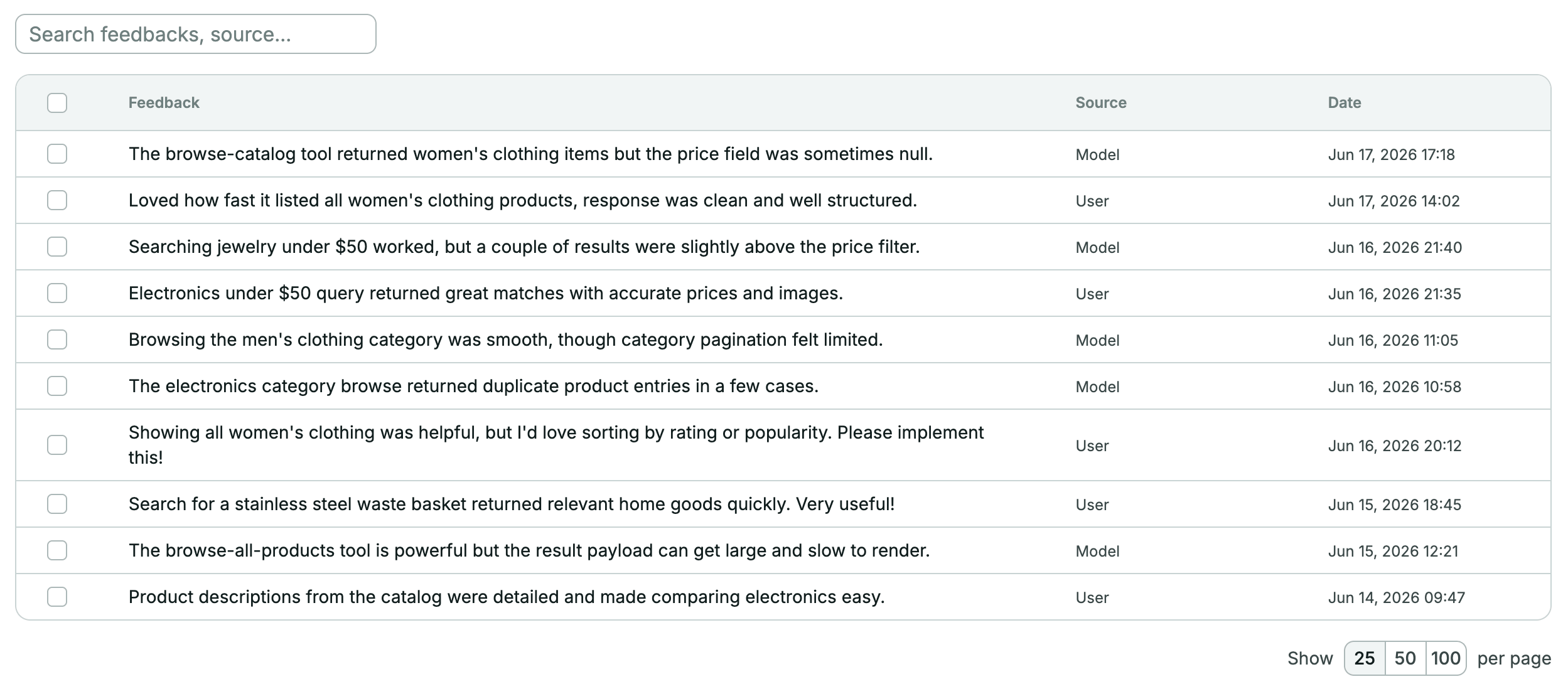
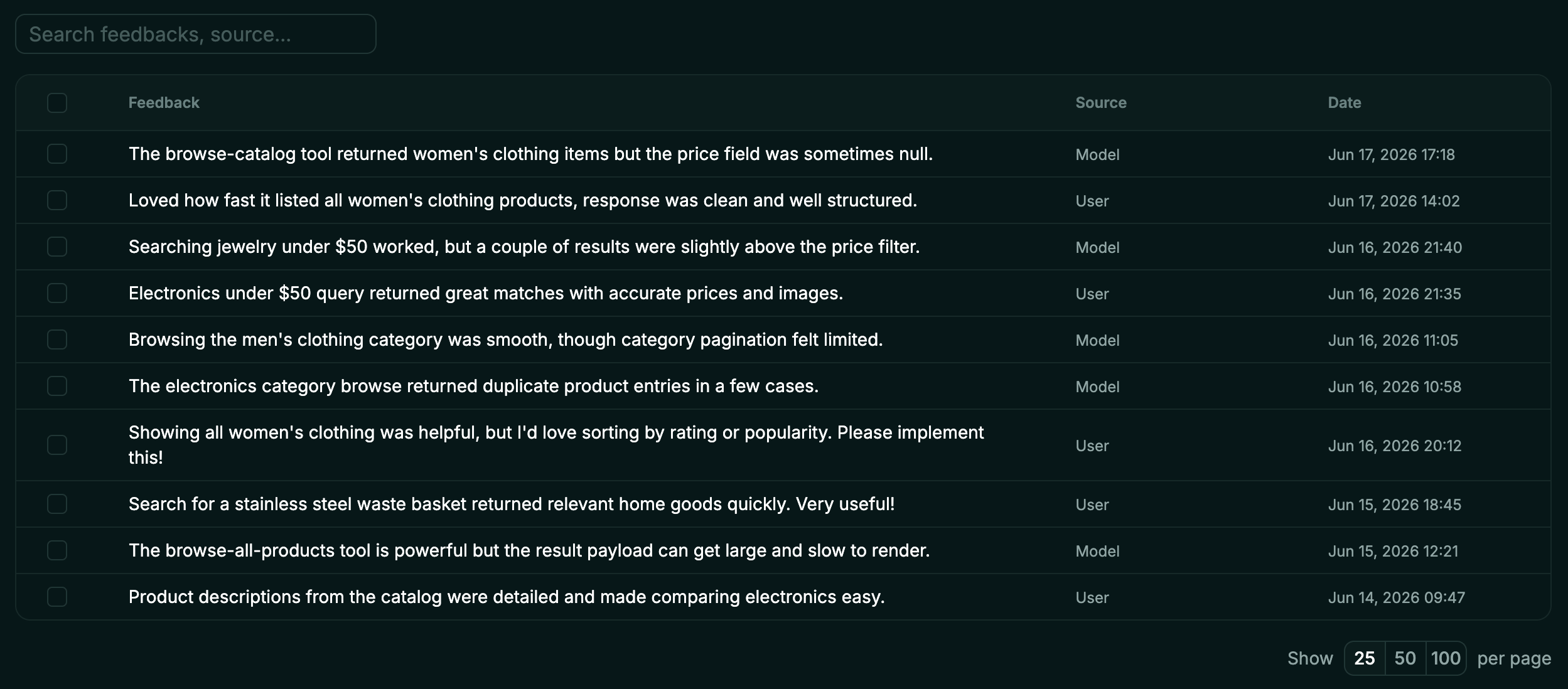 The [`@alpic-ai/insights`](https://www.npmjs.com/package/@alpic-ai/insights) package injects the feedback tool
into your server's tool list. Alpic stores the feedback for you to explore in the dashboard.
### 1. Install the package
```bash theme={null}
pnpm add @alpic-ai/insights
```
### 2. Wire it into your server
The package ships two entry points depending on which MCP framework you're using.
Use `feedbackMiddleware`, it returns a Skybridge `McpMiddlewareFn` you register via `mcpMiddleware()`. Add it
before your tool/widget registrations:
```typescript theme={null}
import { feedbackMiddleware } from "@alpic-ai/insights";
import { McpServer } from "skybridge/server";
const server = new McpServer({ name: "my-mcp-server", version: "1.0.0" }, { capabilities: {} })
.mcpMiddleware(feedbackMiddleware())
.registerTool(/* ... */);
```
Use `captureFeedback`, it accepts an `McpServer` and patches the `tools/list` and `tools/call` in place.
```typescript theme={null}
import { McpServer } from "@modelcontextprotocol/sdk/server/mcp.js";
import { captureFeedback } from "@alpic-ai/insights";
const server = new McpServer(
{ name: "my-mcp-server", version: "1.0.0" },
{ capabilities: {} },
);
server.registerTool(/* ... */);
captureFeedback(server);
```
The middleware adds a `send_feedback` tool to your server at runtime. It is handled entirely by the middleware; you don't need to register it yourself.
### 3. How the LLM uses it
The tool instructs the LLM to:
* Use it **only** for feedback about your MCP server, not about other MCP servers.
* Call it **autonomously** when it detects a genuine issue (e.g. a tool that failed unexpectedly, an unhelpful response, a missing capability). No explicit user consent required.
* Strip any **Personally Identifiable Information** from the content before sending.
The tool accepts two arguments:
| Argument | Required | Description |
| --------- | -------- | -------------------------------------------------------------------------------------------------- |
| `content` | Yes | The feedback content, stripped of any PII. |
| `source` | Yes | Who initiated the feedback: `"user"` if the user asked to send it, `"model"` if sent autonomously. |
### 4. Deploy
Deploy on Alpic as usual. Once the new version is live on the [production environment](/build-deploy/environments), feedback starts flowing in.
### 5. View feedback in the dashboard
In the Alpic dashboard, open your project and click the **Insights** tab, then **Feedbacks**. Each entry shows:
* **Content:** what the feedback says
* **Source:** whether it was sent by the user or the model autonomously
* **Date:** when it was submitted
### Optional: run a custom handler alongside Alpic
Pass a `handler` to run your own logic (e.g. forwarding to Slack or your own analytics) on every captured feedback.
The handler runs **in addition to** Alpic's dashboard delivery (feedback still appears in the **Feedbacks** page) and executes inside your MCP server process:
```typescript theme={null}
.mcpMiddleware(
feedbackMiddleware({
handler: async ({ content, source }) => {
await slack.postMessage({ text: `Feedback [${source}]: ${content}` });
},
}),
)
```
```typescript theme={null}
captureFeedback(server, {
handler: async ({ content, source }) => {
await slack.postMessage({ text: `Feedback [${source}]: ${content}` });
},
});
```
### Combining with User Intents
`feedbackMiddleware`/`captureFeedback` and `intentMiddleware`/`captureIntents` are independent and can be used together:
```typescript theme={null}
import { feedbackMiddleware, intentMiddleware } from "@alpic-ai/insights";
const server = new McpServer({ name: "my-mcp-server", version: "1.0.0" }, { capabilities: {} })
.mcpMiddleware(feedbackMiddleware())
.mcpMiddleware(intentMiddleware())
.registerTool(/* ... */);
```
```typescript theme={null}
import { McpServer } from "@modelcontextprotocol/sdk/server/mcp.js";
import { captureFeedback, captureIntents } from "@alpic-ai/insights";
const server = new McpServer(
{ name: "my-mcp-server", version: "1.0.0" },
{ capabilities: {} },
);
server.registerTool(/* ... */);
captureFeedback(server);
captureIntents(server);
```
`intentMiddleware`/`captureIntents` automatically skips the `send_feedback` tool so it doesn't inject a `user_intent` field
into the feedback tool's schema.
The [`@alpic-ai/insights`](https://www.npmjs.com/package/@alpic-ai/insights) package injects the feedback tool
into your server's tool list. Alpic stores the feedback for you to explore in the dashboard.
### 1. Install the package
```bash theme={null}
pnpm add @alpic-ai/insights
```
### 2. Wire it into your server
The package ships two entry points depending on which MCP framework you're using.
Use `feedbackMiddleware`, it returns a Skybridge `McpMiddlewareFn` you register via `mcpMiddleware()`. Add it
before your tool/widget registrations:
```typescript theme={null}
import { feedbackMiddleware } from "@alpic-ai/insights";
import { McpServer } from "skybridge/server";
const server = new McpServer({ name: "my-mcp-server", version: "1.0.0" }, { capabilities: {} })
.mcpMiddleware(feedbackMiddleware())
.registerTool(/* ... */);
```
Use `captureFeedback`, it accepts an `McpServer` and patches the `tools/list` and `tools/call` in place.
```typescript theme={null}
import { McpServer } from "@modelcontextprotocol/sdk/server/mcp.js";
import { captureFeedback } from "@alpic-ai/insights";
const server = new McpServer(
{ name: "my-mcp-server", version: "1.0.0" },
{ capabilities: {} },
);
server.registerTool(/* ... */);
captureFeedback(server);
```
The middleware adds a `send_feedback` tool to your server at runtime. It is handled entirely by the middleware; you don't need to register it yourself.
### 3. How the LLM uses it
The tool instructs the LLM to:
* Use it **only** for feedback about your MCP server, not about other MCP servers.
* Call it **autonomously** when it detects a genuine issue (e.g. a tool that failed unexpectedly, an unhelpful response, a missing capability). No explicit user consent required.
* Strip any **Personally Identifiable Information** from the content before sending.
The tool accepts two arguments:
| Argument | Required | Description |
| --------- | -------- | -------------------------------------------------------------------------------------------------- |
| `content` | Yes | The feedback content, stripped of any PII. |
| `source` | Yes | Who initiated the feedback: `"user"` if the user asked to send it, `"model"` if sent autonomously. |
### 4. Deploy
Deploy on Alpic as usual. Once the new version is live on the [production environment](/build-deploy/environments), feedback starts flowing in.
### 5. View feedback in the dashboard
In the Alpic dashboard, open your project and click the **Insights** tab, then **Feedbacks**. Each entry shows:
* **Content:** what the feedback says
* **Source:** whether it was sent by the user or the model autonomously
* **Date:** when it was submitted
### Optional: run a custom handler alongside Alpic
Pass a `handler` to run your own logic (e.g. forwarding to Slack or your own analytics) on every captured feedback.
The handler runs **in addition to** Alpic's dashboard delivery (feedback still appears in the **Feedbacks** page) and executes inside your MCP server process:
```typescript theme={null}
.mcpMiddleware(
feedbackMiddleware({
handler: async ({ content, source }) => {
await slack.postMessage({ text: `Feedback [${source}]: ${content}` });
},
}),
)
```
```typescript theme={null}
captureFeedback(server, {
handler: async ({ content, source }) => {
await slack.postMessage({ text: `Feedback [${source}]: ${content}` });
},
});
```
### Combining with User Intents
`feedbackMiddleware`/`captureFeedback` and `intentMiddleware`/`captureIntents` are independent and can be used together:
```typescript theme={null}
import { feedbackMiddleware, intentMiddleware } from "@alpic-ai/insights";
const server = new McpServer({ name: "my-mcp-server", version: "1.0.0" }, { capabilities: {} })
.mcpMiddleware(feedbackMiddleware())
.mcpMiddleware(intentMiddleware())
.registerTool(/* ... */);
```
```typescript theme={null}
import { McpServer } from "@modelcontextprotocol/sdk/server/mcp.js";
import { captureFeedback, captureIntents } from "@alpic-ai/insights";
const server = new McpServer(
{ name: "my-mcp-server", version: "1.0.0" },
{ capabilities: {} },
);
server.registerTool(/* ... */);
captureFeedback(server);
captureIntents(server);
```
`intentMiddleware`/`captureIntents` automatically skips the `send_feedback` tool so it doesn't inject a `user_intent` field
into the feedback tool's schema.