

403 Forbidden response.
This is useful when you want to limit access to known clients, such as ChatGPT or Claude, or restrict usage to your corporate network.
Platform Selection
For common platforms, Alpic maintains up-to-date IP lists so you don’t have to manage them manually. Simply select the platforms you want to allow.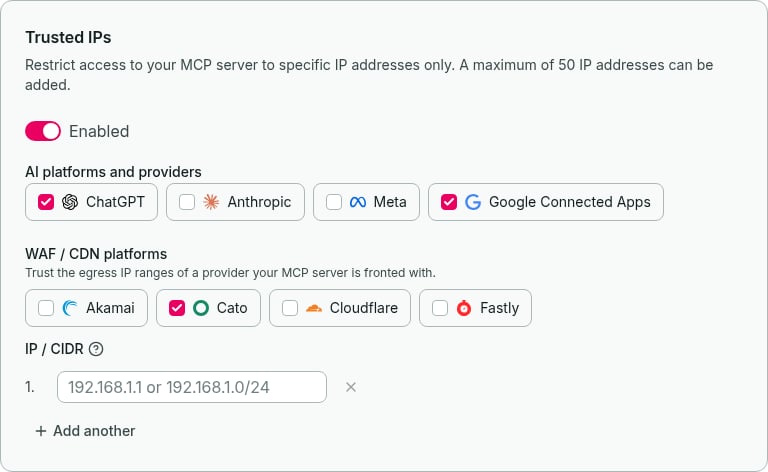
AI platforms and providers
Select the platforms and providers whose requests you want to allow:
ChatGPT IPs are fetched dynamically and remain up to date automatically. Anthropic IPs are updated with Alpic releases, so changes to its published ranges may take a short while to appear.
The Meta option trusts the network ranges listed by Cloud IP Ranges, including the addresses observed for Muse MCP connections. This is a third-party list of Meta networks, not an official Meta or Muse-only MCP feed. Alpic keeps the last successfully fetched ranges if a refresh fails; if the first fetch fails, no Meta ranges are trusted until a fetch succeeds.
Google Connected Apps uses both official feeds recommended in Google’s connection prerequisites. Alpic combines and deduplicates their IPv4 and IPv6 ranges. These shared networks serve user-triggered fetchers and agents beyond MCP connections.
If either Google feed fails to load or contains invalid ranges, Alpic keeps the last successfully fetched combined list. Until the first successful fetch, selecting Google trusts no Google ranges.
WAF / CDN platforms
If your MCP server is fronted by a WAF or CDN, trust that provider’s egress IP ranges so requests forwarded through it aren’t blocked:
Cato publishes no machine-readable feed, so its PoP ranges — including the China PoPs — are updated with Alpic releases, meaning a newly published PoP range may take a short while to be reflected.
Custom IPs
You can also add up to 50 custom IP addresses or CIDR ranges per environment. Supported formats:- IPv4 addresses (e.g.,
203.0.113.10) - IPv6 addresses (e.g.,
2001:db8::1) - IPv4 CIDR ranges (e.g.,
203.0.113.0/24) - IPv6 CIDR ranges (e.g.,
2001:db8::/32)
Setup
1
Navigate to Distribution
In your Alpic dashboard, open your project and go to the Distribution tab, then select the Trusted IPs section.
2
Enable IP whitelisting
Toggle the IP whitelist switch to enable the feature.
3
Select platforms and/or add custom IPs
Check the AI platforms and providers you want to allow (ChatGPT, Anthropic, Meta, Google Connected Apps), WAF/CDN
providers (Akamai, Cato, Cloudflare, Fastly), or both. You can also add custom IP addresses or CIDR ranges.
4
Save
Click Save changes to apply the changes. The restrictions take effect immediately for new requests.
IPv4-mapped IPv6 addresses (e.g.,
::ffff:192.168.1.1) are automatically normalized, so you only need to add the IPv4
form.